
Navne på dele
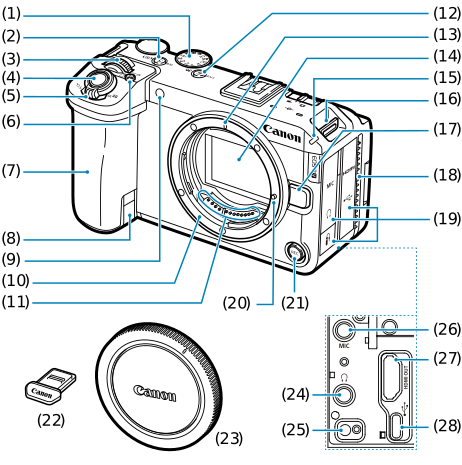
- (1) Programvælger
- (2)
 /
/ /
/ 5/Hvidbalance/afspilning af film eller billeder-knap
 - (3)
 Kommandovælger
 - (4) Filmoptagelse (øverst)/udløser-knap
- (5) Zoomvælger
Under optagelse: W Vidvinkel/T Telefoto
Under afspilning:
 Indeks/
 Forstør
 - (6)
 /
/ /
/ 4/Multifunktionsknap/send billeder til smartphone-knap
 - (7) Greb (Batterirum)
- (8) Åbning til DC-ledning
- (9) Indikator for selvudløser/AF-hjælpelys
- (10) Objektivfatning
- (11) Kontakter
- (12)
 /
/ /
/ 6/Livestreaming/billedsøgning-knap
- (13) Monteringsmærke til RF-objektiv
- (14) Billedsensor
- (15) Følgelampe
- (16) Remholder
- (17) Udløserknap til objektiv
- (18) Udluftningsventil
- (19) Stikdæksel
- (20) Låsestift til objektiv
- (21) REC Knap til filmoptagelse (forside)
- (22) Skodæksel
- (23) Kameradæksel
- (24)
 Stik til hovedtelefoner
 - (25)
 Fjernbetjeningsstik
 - (26)
 Ekstern mikrofon IN-stik
 - (27)
 HDMI OUT-stik
 - (28)
 Digitalstik
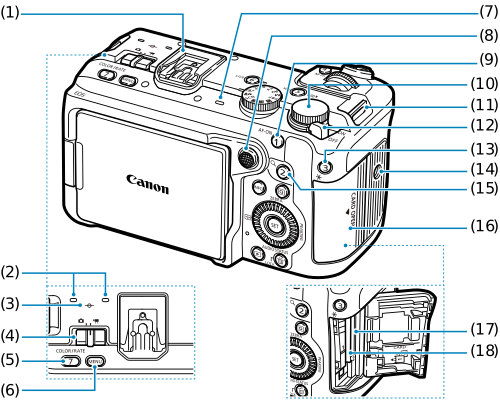
- (1) Multifunktionssko
- (2) Mikrofon
- (3)
 Mærke for billedplan
 - (4)
 /
/ Stillbilledoptagelses-/filmoptagelsesknap
 - (5)
 /
/ /
/ 7/Farvetilstand/bedømmelsesknap
 - (6)
 Menu-knap
 - (7) Højttaler
- (8)
 Multikontrol (kan også presses lige ind)
 - (9)
 /
/ 1/AF-startknap
- (10)
 Quick Control-vælger 2
 - (11) Remholder
- (12)
 /
/ Afbryder
 - (13)
 /
/ 3/AE-låseknap
 - (14) Stativgevind
- (15)
 / 2/forstør/reducér-knap
 - (16) Låg til kortslot
- (17) Kortslot 2
- (18) Kortslot 1
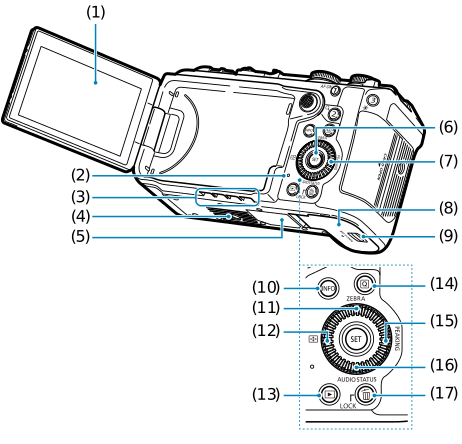
- (1) Skærm
- (2) Adgangsindikator
- (3) Tilgangsventil
- (4) Stativgevind
- (5) Serienummer (nummer på kamerahus)
- (6)
 Indstillingsknap
 - (7)
 /
/ Quick Control-vælger 1/krydstaster
 - (8) Batterirummets dæksel
- (9) Dæksellås til batterirum
- (10)
 Info-knap
- (11)
 /ZEBRA Op/zebra-knap
 - (12)
 /
/ Venstre/AF-punktvalg-knap
 - (13)
 Afspilningsknap
 - (14)
 Quick Control-knap
 - (15)
 /PEAKING Højre/peaking-knap
 - (16)
 /AUDIO STATUS Ned/lydstatus-knap
 - (17)
 /
/ Multifunktionslås/sletteknap
Programvælger
Programvælgeren er opdelt i programmer i Basiszone og Kreativ zone.
I program i Basiszone bestemmer kameraet de optimale indstillinger for motivet eller scenen. I Kreativ zone kan du optage med din foretrukne eksponering eller andre indstillinger.
(1) Basiszone
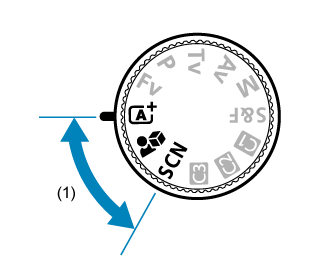
(2) Kreativ zone / (3) Brugerdefineret optagelsesmetode
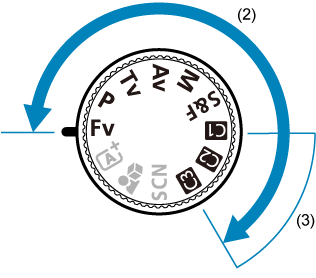
Programvælger og optagelsesmetoder
| Programvælger | Optagelsesmetode | ||
|---|---|---|---|
| Filmoptagelse |
Stillbilledoptagelse |
||
| Basiszone |  |
Scene Intelligent Auto-film | Scene Intelligent Auto |
 |
Film til prøvevisning af næroptagelse | ||
|
Specialscene |
|||
| Kreativ zone | Fv | Automatisk filmeksponering | Fleksibelt prioriteret AE |
| P | Program AE | ||
| Tv | Lukkerprioriteret AE for film | Lukkerprioriteret AE | |
| Av | Blændeprioritet AE for film | Blændeprioritet AE | |
| M | Manuel filmeksponering | Manuel eksponering | |
 |
Langsom/hurtig film | Program AE | |
|
Brugerdefineret optagelsesmetode |
Brugerdefinerede optagelsesmetoder | Brugerdefinerede optagelsesmetoder | |


Batterioplader LC-E6
Oplader til batteripakke LP-E6P/LP-E6NH/LP-E6N/LP-E6 ().
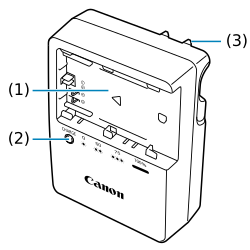
- (1) Batterislot
- (2) Opladningsindikator
- (3) Strømstik
Batterioplader LC-E6E
Oplader til batteripakke LP-E6P/LP-E6NH/LP-E6N/LP-E6 ().
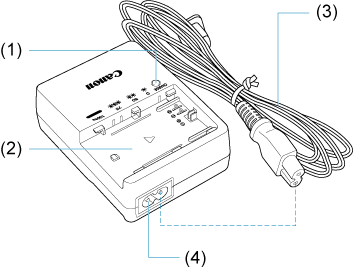
- (1) Opladningsindikator
- (2) Batterislot
- (3) Strømkabel
- (4) Stik til lysnetledning
Fastgørelse af remmen
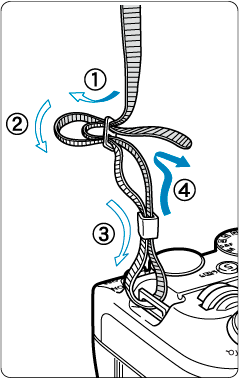
Før den ene ende af remmen gennem remholderen fra bunden, og før den derefter igennem remspændet, sådan som det er vist. Træk i remmen for at stramme den, og sørg for, at remmen ikke går løs af spændet.