
Valotushaarukointi (AEB)
Valotuksen haarukoinnissa otetaan kolme peräkkäistä kuvaa eri valotuksilla säätämällä automaattisesti valotusaikaa, aukkoarvoa ja ISO-herkkyyttä.
AEB tarkoittaa Auto Exposure Bracketing (valotushaarukointi).
-
Määritä valotuksen haarukointialue.
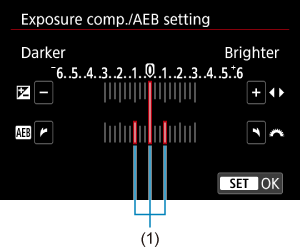
- Määritä valotuksen haarukointialue (1) kääntämällä
 -valintakiekkoa.
 -painikkeita painamalla voit säätää valotuksen korjauksen määrää.
 - Aseta se painamalla
 -painiketta.
 - Kun suljet valikon, valotuksen haarukointialue näkyy näytössä.
- Määritä valotuksen haarukointialue (1) kääntämällä
-
Ota kuva.
Normaali valotus

Alennettu valotus

Pidempi valotus

- Kolme haarukoitua kuvaa otetaan määritetyn kuvaustavan mukaan tässä järjestyksessä: normaali valotus, alennettu valotus ja pidempi valotus.
- Valotushaarukointia ei peruuteta automaattisesti. Voit peruuttaa valotushaarukoinnin poistamalla valotuksen haarukointialueen näytön käytöstä vaiheen 2 mukaisesti.
 :
: Huomio
Huomautus
- Valotuksen haarukointialue vilkkuu valotushaarukoinnin aikana.
- Jos kuvaustavaksi on määritetty [
 ], paina laukaisinta kolme kertaa kutakin kuvaa varten. Tilassa [
 ], [
], [ ] tai [
 ] laukaisimen pitäminen alhaalla ottaa kolme kuvaa peräkkäin, ennen kuin kamera lopettaa kuvaamisen automaattisesti. Kun [
 ] tai [
 ] on valittu, kolme peräkkäistä kuvaa otetaan 10 sekunnin viiveen jälkeen. Kun [
 ] on valittu, kolme peräkkäistä kuvaa otetaan 2 sekunnin viiveen jälkeen.
 - Voit määrittää valotushaarukoinnin yhdessä valotuksen korjauksen kanssa ().
- Valotushaarukointi ei ole käytettävissä, kun tarkennushaarukointi on määritetty.
- Valotushaarukointi perutaan automaattisesti, kun virtakytkin asetetaan asentoon
 .
.