
Charging the Battery
-
Upon purchase, the battery is not fully charged.
Charge the battery before use.
-
Charge the battery on the day before or on the day it is to be used.
Charged batteries gradually lose their charge, even when they are not used.
-
When not using the camera, remove the battery.
If the battery is left in the camera for a prolonged period, a small amount of power current will keep being released, resulting in excess discharge and shorter battery life. Store the battery with the protective cover attached. Storing the battery when it is fully charged may lower the battery performance.
-
If the battery becomes exhausted quickly even after having been fully charged, the battery has reached the end of its service life.
Check the battery's recharge performance () and purchase a new battery.
Using a Battery Charger to Charge the Battery
You can use the LC-E17 Series (LC-E17/LC-E17E/LC-E17C) battery chargers (sold separately) to charge the battery.
-
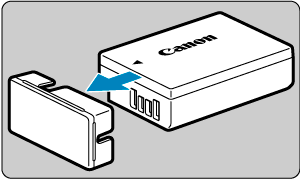
Detach the protective cover provided with the battery.
-
Fully insert the battery into the charger.
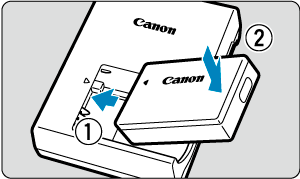
- Do the opposite to remove the battery.
-
Charge the battery.
LC-E17
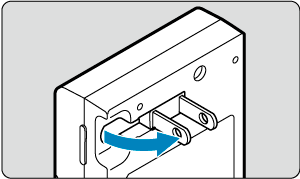
- Flip out the charger prongs as shown and plug the charger into a power outlet.
LC-E17E
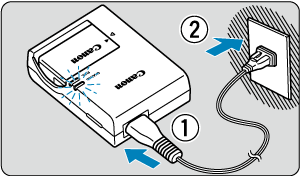
- Connect the power cord to the charger and insert the plug into a power outlet.
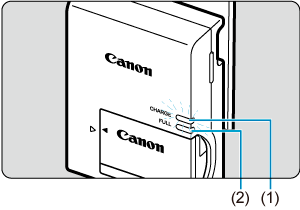
- Charging starts automatically and the charge lamp (1) lights up in orange.
- When the battery is fully charged, the full-charge lamp (2) will light up in green.
-
Charging a depleted battery takes approx. 2 hr. at room temperature (23°C/73°F).
The time required to charge the battery will vary greatly depending on the ambient temperature and the battery's remaining capacity.
- For safety, charging in low temperatures (5–10°C/41–50°F) takes longer (up to approx. 4 hr.).
-
After charging the battery, remove it and disconnect the charger from the power outlet.
-
The battery charger can also be used in foreign countries.
The battery charger is compatible with a 100 V AC to 240 V AC 50/60 Hz power source. If necessary, attach a commercially available plug adapter for the respective country or region. To avoid damage, do not connect to portable voltage transformers.
Caution
- After disconnecting the charger's power plug, do not touch the prongs for approx. 5 sec.
Using a USB Power Adapter to Charge/Power the Camera
Using USB Power Adapter PD-E2 (sold separately), you can charge Battery Pack LP-E17 without removing it from the camera. The camera can also be powered.
Charging
-
Connect the USB power adapter.
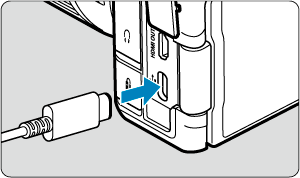
- With the camera power switch set to
 , insert the USB power adapter plug fully into the digital terminal.
- With the camera power switch set to
-
Connect the power cord.
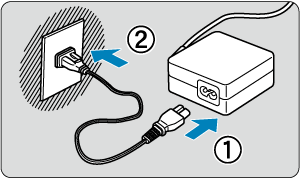
- Connect the power cord to the USB power adapter and plug the other end into a power outlet.
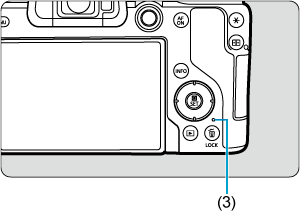
- Charging begins, and the access lamp (3) is lit in green.
- When charging is finished, the access lamp turns off.
Supplying power
To power the camera without charging batteries, set the camera power switch to 
 . However, batteries are charged during auto power off.
The battery level indicator is gray when power is supplied.
To change from powering the camera to charging, set the camera power switch to .
Caution
- The camera cannot be powered unless a battery pack is in it.
- When batteries are depleted, the adapter charges them. In this case, power is not supplied to the camera.
- To protect the battery pack and keep it in optimal condition, do not charge it continuously for more than 24 hours.
- Charged batteries gradually lose their charge, even when they are not used.
- If the charging lamp fails to light up or a problem occurs during charging (shown by the access lamp blinking in green), unplug the power cord, reinsert the battery, and wait a few minutes before plugging it in again. If the problem persists, take the camera to the nearest Canon Service Center.
- The charging time required and the amount charged vary depending on ambient temperature and remaining capacity.
- For safety, charging in low temperatures takes longer.
- The remaining battery level may decline when power is supplied to the camera. To avoid running out of battery power, use a fully charged battery.
- Before disconnecting USB power adapters, set the camera power switch to .
- Some commercially available power adapters have been confirmed to charge and power the camera. For details, check the Canon website ().