
Setting Exposure Compensation
Exposure compensation can be performed with the remote control.
-
Connect the remote control to the camera.
-
Set the camera.
- Select a shooting mode that allows exposure compensation.
-
Set the remote control switch.
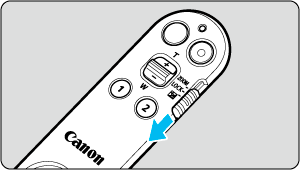
- Set the zoom/lock/exposure compensation switch to
 .
.
- Set the zoom/lock/exposure compensation switch to
-
Set exposure compensation.
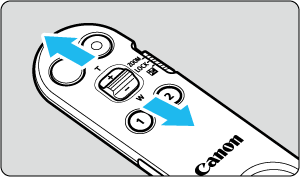
- Move the exposure compensation lever. Moving it to
 will make the image brighter, and moving it towards
  will make the image darker.
 - Exposure compensation is adjusted with each individual press of the lever. Holding down the lever does not continually make adjustments to exposure compensation.
- Move the exposure compensation lever. Moving it to