
Attaching an External Microphone
Use the microphone bracket when attaching an external microphone.
Horizontal Shooting
-
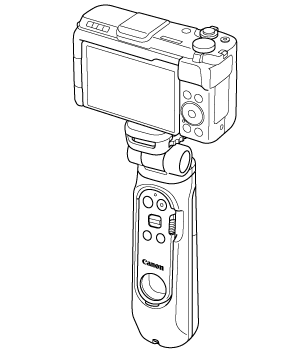
Attach the camera as shown ().
-
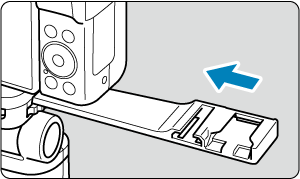
Insert microphone bracket L in the camera mount.
-
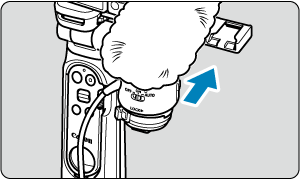
Attach the external microphone to microphone bracket L.
- Refer to the external microphone's instructions on how to attach.
-
Attach the connector from the external microphone to the external microphone IN terminal on the camera.
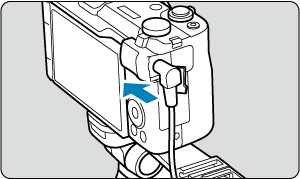
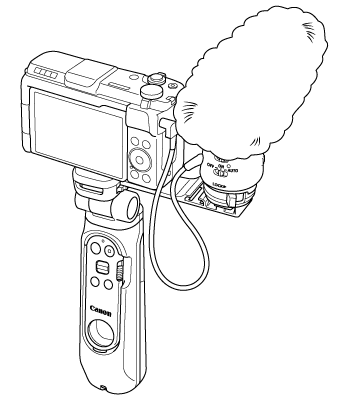
- To remove the camera, reverse the order.
Caution
- Avoid mounting an item other than an external microphone on microphone bracket L.
- To remove the external microphone from microphone bracket L, first disconnect the external microphone connector.
- When removing microphone bracket L from the camera mount, check that you are not pulling the bracket in the direction of nearby persons or a wall.
Vertical Shooting
-
Attach the camera as shown ().
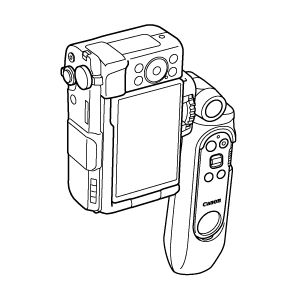
-
Insert microphone bracket S into microphone bracket L.
- Do not insert microphone bracket S backwards.
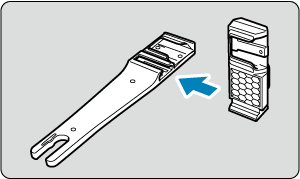
-
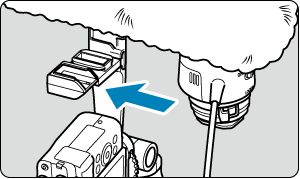
Insert microphone bracket L in the camera mount.
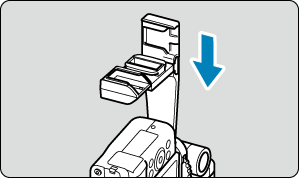
-
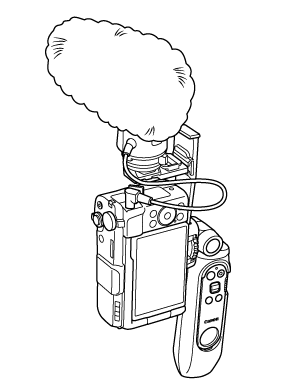
Attach the external microphone to microphone bracket S.
- Refer to the external microphone's instructions on how to attach.
-
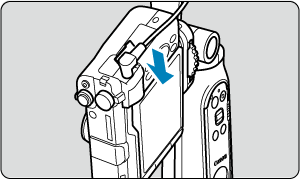
Attach the connector from the external microphone to the external microphone IN terminal on the camera.
- To remove the camera, reverse the order.
Caution
- Avoid mounting an item other than an external microphone on microphone bracket S.
- To remove the external microphone from microphone bracket S, first disconnect the external microphone connector.
- When removing microphone bracket L from the camera mount, check that you are not pulling the bracket in the direction of nearby persons or a wall.