
Jutiklio valymas
Fotoaparato jutiklio valymo funkcija nuvalo vaizdo jutiklio priekinę dalį.
Pastaba
- Geriausių rezultatų pasieksite, jei valysite fotoaparatą padėję ant stalo ar kito lygaus paviršiaus.
Valymas dabar
-
Pasirinkite [Clean now
 /Valyti dabar].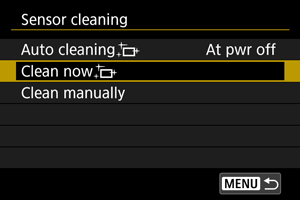
-
Pasirinkite [OK/Gerai].
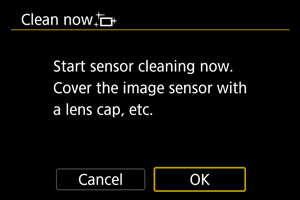
 :
: Pastaba
- Net jei pakartosite jutiklio valymo procedūrą, rezultatas ne ką pagerės. Atminkite, kad ką tik nuvalius, nuostatos [Clean now/Valyti dabar] gali nerodyti.
Valymas automatiškai
-
Pasirinkite [Auto cleaning
/Automatinis valymas].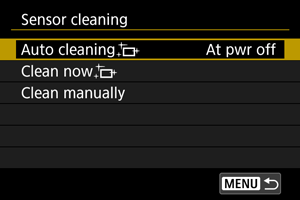
-
Pasirinkite parinktį.
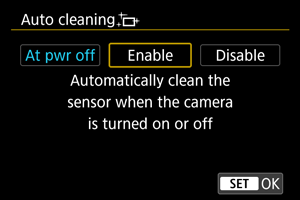
- Sukdami ratuką
 , pasirinkite parinktį, po to paspauskite
  .
.
- Sukdami ratuką
Pastaba
- Kai nustatyta [At pwr off/Išsijungus] arba [Enable/Įjungti], jutiklis valomas, kai ekranas išsijungia, įskaitant tuomet, kai jis išjungiamas automatiškai.
Valymas rankiniu būdu
Dulkes, kurių nepavyko pašalinti automatinio valymo metu, galima pašalinti rankiniu būdu, naudojant prekyboje esantį pūtiklį ar panašų įrankį.
Vaizdo jutiklis yra labai jautrus. Jei reikia nuvalyti jutiklio paviršių, rekomenduojame kreiptis į „Canon“ paslaugų centrą.
-
Pasirinkite [Clean manually/Valyti rankiniu būdu].
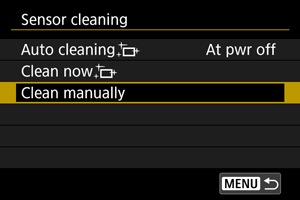
-
Pasirinkite [OK/Gerai].
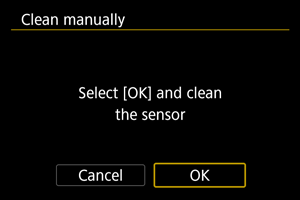
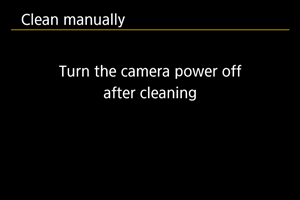
-
Atjunkite objektyvą ir nuvalykite jutiklį.
-
Užbaikite valymo procedūrą.
- Nustatykite maitinimo jungiklį į padėtį
 .
.
- Nustatykite maitinimo jungiklį į padėtį
Pastaba
- Rekomenduojame naudoti priedus, skirtus maitinti iš elektros tinklo lizdo (parduodami atskirai).
Atsargiai
-
Valant jutiklį negalima atlikti toliau išvardytų veiksmų.
- Pastumti maitinimo jungiklį į padėtį .
- Išimti ir įdėti bateriją.
- Pastumti maitinimo jungiklį į padėtį
- Vaizdo jutiklio paviršius yra labai jautrus. Jutiklį valykite atsargiai.
- Naudokite vien tik pūtiklį, be šepetėlio. Šepetėlis gali subraižyti jutiklį.
- Nekiškite pūtiklio galiuko į fotoaparatą giliau objektyvo apsodo.
- Jutikliui valyti jokiu būdu nenaudokite suspausto oro arba dujų. Suspausto oro srautas gali pažeisti jutiklį arba ant jutiklio paviršiaus gali užšalti purškiamos dujos ir jį subraižyti.
- Jei jutiklio valymo metu baterijų lygis nukris, pasigirs įspėjamasis pyptelėjimas. Nutraukite jutiklio valymą.
- Jei ant jutiklio liko dėmė, kurios pūtikliu nepavyko pašalinti, rekomenduojame fotoaparatą nugabenti į „Canon“ paslaugų centrą, kad jutiklis būtų nuvalytas profesionaliai.