
Custom Functions (C.Fn)
Setting Custom Functions
-
Select [
 : Custom Functions(C.Fn)].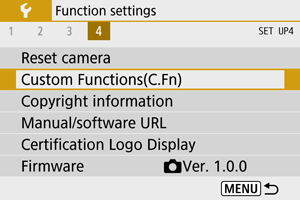
-
Select a Custom Function number.
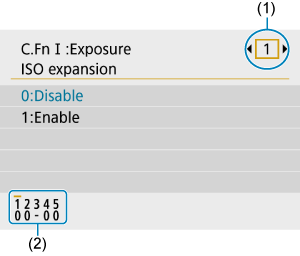
- Use the

 keys to select the number of a Custom Function to configure (1), then press the
  button.
 - Current Custom Function settings are indicated below the respective function number at the bottom of the screen (2).
- Use the
-
Change the setting as desired.
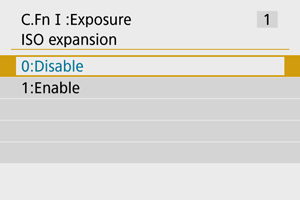
- Select a setting option.
- To set up another Custom Function, repeat steps 2–3.
Note
- To clear all Custom Function settings you have configured (except [Custom Controls]), access [: Reset camera] and select [Custom Functions(C.Fn)] in [Other settings].
Custom Functions
 Shading indicates that the Custom Function does not apply to this still photo shooting or movie recording. (The settings have no effect.)
-
C.Fn I: Exposure
 Still Photo Shooting
 Movie Recording
(1) ISO expansion ○ ○ (2) Safety shift ○ -
C.Fn II: Others
Still Photo Shooting Movie Recording(3) Custom Controls Varies by settings (4) Release shutter w/o lens ○ ○ (5) Retract lens on power off ○ ○
Custom Function Setting Items
Custom Functions are divided into two groups by function: C.Fn I: Exposure and C.Fn II: Others.
C.Fn I: Exposure
C.Fn 1: ISO expansion
Makes “H” (equivalent to ISO 25600) available as an ISO speed you can set. Note that expanded ISO speeds (H) are not available when [ : Highlight tone priority] is set to [Enable] or [Enhanced].
- 0:Disable
- 1:Enable
C.Fn 2: Safety shift
You can shoot with the shutter speed and aperture value automatically adjusted to enable standard exposure if standard exposure would not be available under your specified shutter speed or aperture value in Tv or Av mode.
- 0:Disable
- 1:Enable
C.Fn II: Others
C.Fn 3: Custom Controls
You can assign frequently used functions to camera buttons that are easy for you to use.
-
Select a camera control.
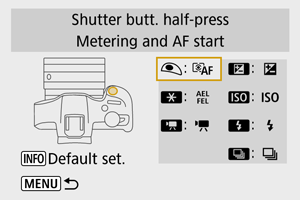
-
Select a function to assign.
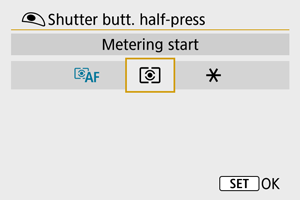
- Press the button to set it.
- Press the
Note
- With the screen in step 1 displayed, you can press the
 button to restore the Custom Control settings to their defaults. [Custom Controls] are not cleared even if you access [Reset camera] and select [Custom Functions(C.Fn)] in [Other settings].
Functions available for camera controls
-
AF
| ●: Default ○: Available for customization | |||||||||||||
| Function |  |
 |
 |
 |
 |
 |
 |
||||||
|---|---|---|---|---|---|---|---|---|---|---|---|---|---|
 |
Metering and AF start | ● | ○ | ||||||||||
 |
AF stop | ○ | |||||||||||
 |
Set AF point to center | ○ | ○ | ○ | ○ | ○ | |||||||
 |
One-Shot AF  Servo AF Servo AF |
○ | ○ | ○ | ○ | ○ | |||||||
 |
AF method | ○ | ○ | ○ | ○ | ○ | |||||||
 |
Eye detection | ○ | ○ | ○ | ○ | ○ | |||||||
 |
Subject to track selection | ○ | ○ | ○ | ○ | ○ | |||||||
-
MF
| ●: Default ○: Available for customization | |||||||||||||
| Function | |
|
|
|
|
|
|
||||||
|---|---|---|---|---|---|---|---|---|---|---|---|---|---|
 |
Manual focus | ○ | ○ | ○ | ○ | ○ | |||||||
 |
Peaking | ○ | ○ | ○ | ○ | ○ | |||||||
-
Exposure
| ●: Default ○: Available for customization | |||||||||||||
| Function | |
|
|
|
|
|
|
||||||
|---|---|---|---|---|---|---|---|---|---|---|---|---|---|
 |
Metering start | ○ | |||||||||||
 |
AE lock | ○ | |||||||||||
|
AE lock (while button pressed) | ○ | |||||||||||
 |
AE lock/FE lock | ● | |||||||||||
 |
Exposure compensation | ○ | ● | ○ | ○ | ○ | |||||||
 |
Set ISO speed | ○ | ○ | ○ | ● | ○ | |||||||
|
Metering mode | ○ | ○ | ○ | ○ | ○ | |||||||
 |
Flash function settings | ○ | ○ | ○ | ○ | ○ | |||||||
 |
Flash firing | ○ | ○ | ○ | ○ | ● | |||||||
 |
FE lock | ○ | |||||||||||
-
Movies
| ●: Default ○: Available for customization | |||||||||||||
| Function | |
|
|
|
|
|
|
||||||
|---|---|---|---|---|---|---|---|---|---|---|---|---|---|
|
Movie recording | ● | ○ | ○ | ○ | ○ | |||||||
 |
Pause Movie Servo AF | ○ | ○ | ○ | ○ | ○ | |||||||
-
Image
| ●: Default ○: Available for customization | |||||||||||||
| Function | |
|
|
|
|
|
|
||||||
|---|---|---|---|---|---|---|---|---|---|---|---|---|---|
 |
Image quality | ○ | ○ | ○ | ○ | ○ | |||||||
 |
One-touch image quality setting | ○ | ○ | ○ | ○ | ○ | |||||||
 |
One-touch image quality (hold) | ○ | ○ | ○ | ○ | ○ | |||||||
 |
Still img aspect ratio | ○ | ○ | ○ | ○ | ○ | |||||||
 |
Auto Lighting Optimizer | ○ | ○ | ○ | ○ | ○ | |||||||
 |
White balance | ○ | ○ | ○ | ○ | ○ | |||||||
 |
Picture Style | ○ | ○ | ○ | ○ | ○ | |||||||
-
Operation
| ●: Default ○: Available for customization | |||||||||||||
| Function | |
|
|
|
|
|
|
||||||
|---|---|---|---|---|---|---|---|---|---|---|---|---|---|
 |
Depth-of-field preview | ○ | ○ | ○ | ○ | ○ | |||||||
 |
Magnify | ○ | ○ | ○ | ○ | ○ | |||||||
 |
Image replay | ○ | ○ | ○ | ○ | ○ | |||||||
 |
Magnify images during playback | ○ | ○ | ○ | ○ | ○ | |||||||
 |
Menu display | ○ | ○ | ○ | ○ | ○ | |||||||
 |
Drive mode | ○ | ○ | ● | ○ | ○ | |||||||
 |
Select folder | ○ | ○ | ○ | ○ | ○ | |||||||
 |
Create folder | ○ | ○ | ○ | ○ | ○ | |||||||
 |
Maximize screen brightness (temp) | ○ | ○ | ○ | ○ | ○ | |||||||
 |
Display off | ○ | ○ | ○ | ○ | ○ | |||||||
 |
Switch between VF/screen | ○ | ○ | ○ | ○ | ○ | |||||||
 |
Eco mode | ○ | ○ | ○ | ○ | ○ | |||||||
 |
Wi-Fi/Bluetooth connection | ○ | ○ | ○ | ○ | ○ | |||||||
 |
No function (disabled) | ○ | ○ | ○ | ○ | ○ | ○ | ||||||
C.Fn 4: Release shutter w/o lens
You can specify whether shooting still photos or movies is possible without a lens attached to the camera.
- 0:Disable
- 1:Enable
C.Fn 5: Retract lens on power off
You can set whether to retract gear-type STM lenses (such as RF35mm F1.8 Macro IS STM) automatically when the camera's power switch is set to  .
.
-
0:Enable
-
1:Disable
Caution
- With auto power off, the lens will not retract regardless of the setting.
- Before detaching the lens, make sure that it is retracted.
Note
- When [0:Enable] is set, this function takes effect regardless of the lens's focus mode switch setting (AF or MF).