
Selecting the Drive Mode
Single and continuous drive modes are provided. You can select the drive mode suiting the scene or subject.
-
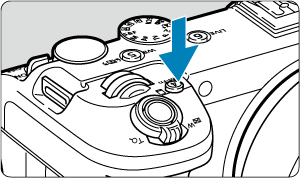
Press the
 button (
 ).
).
- With an image displayed on the screen, press the button.
- With an image displayed on the screen, press the
-
Select the drive mode item.
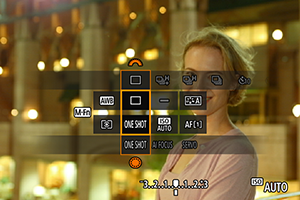
- Press the button to select the drive mode item.
- Press the
-
Select the drive mode.
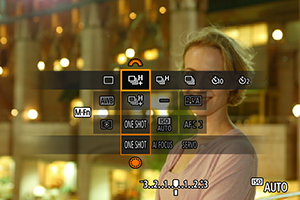
- Turn the
 dial to make a selection.
- Turn the
-
 : Single shooting
When you hold down the shutter button completely, only one shot will be taken.
-
 : High-speed continuous shooting +
When you hold down the shutter button completely, you can shoot continuously at up to approx. 40 shots/sec. while you keep holding it down.
-
 : High-speed continuous shooting
When you hold down the shutter button completely, you can shoot continuously at up to approx. 20 shots/sec. while you keep holding it down.
-
 : Low-speed continuous shooting
When you hold down the shutter button completely, you can shoot continuously at up to approx. 5.0 shots/sec. while you keep holding it down.
-
 : Self-timer: 10 sec. /
  : Self-timer: 2 sec. /
  : Self-timer: Continuous shooting
For details on self-timer shooting, see Using the Self-Timer ().
Caution
-
Setting the drive mode to [
] enables a continuous shooting speed of approx. 40 shots/sec. under these conditions.- Shutter speed: 1/40 sec. or faster
Note that the continuous shooting speed may be less than 40 shots/sec. if any of the following occurs during continuous shooting.
- Switching to P or Tv shooting mode, or applying settings that cause the aperture value to change in Fv mode
- Zooming is performed
- Manual focusing is performed
- Servo AF changes the position in focus
- A power source other than Battery Pack LP-E6P or DC Coupler DR-E6P is used
- Various factors may lower the continuous shooting speed, such as battery level, temperature, shutter speed, aperture value, subject conditions, brightness, AF operation, type of lens, use of flash, and shooting settings.
- Continuous shooting speed in flash photography is equivalent to [] even if [] or [] is set.
- Visit the Canon website for details on lenses supporting the maximum continuous shooting speed ().
- Continuous shooting speed with Servo AF may be slower depending on subject conditions or the lens used.
- When you shoot under a flickering light source, the continuous shooting speed may be lower.
- When internal memory becomes full during continuous shooting, the continuous shooting speed may drop off because shooting will be temporarily disabled ().
- Continuous shooting speed may be slower and image display may stop under some shooting conditions.
Note
- Continuous shooting speed indicated for each drive mode is the speed under default camera settings.