
Operating the Zoom
Zoom operations can be performed with the remote control.
-
Connect the remote control to the camera.
-
Set the camera.
- When using a Power Zoom Adapter, set the Power Zoom Adapter.
-
Set the remote control.
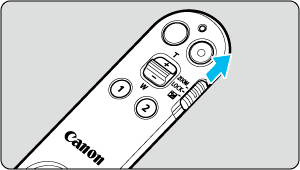
- Set the zoom/lock/exposure compensation switch to a position other than
 .
.
- Set the zoom/lock/exposure compensation switch to a position other than
-
Operate the zoom.
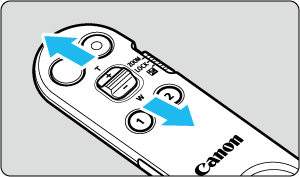
- Move the zoom lever. Zoom by moving the lever to
 for wide-angle, and moving it to
  for telephoto.
- Move the zoom lever. Zoom by moving the lever to
Note
- The lever has two steps and depending on the camera it is possible to set optical zoom speeds to the two steps. For supported models, refer to the Canon website.
- For details on attaching a Power Zoom Adapter to the lens and details on operations, refer to the Power Zoom Adapter instruction manual.