
Ақпарат дисплейі
Фотосуретке түсіру экраны
 түймесі басылған сайын ақпарат дисплейі өзгереді.
- Дисплей ағымда қолданылған параметрлерді ғана көрсетеді.
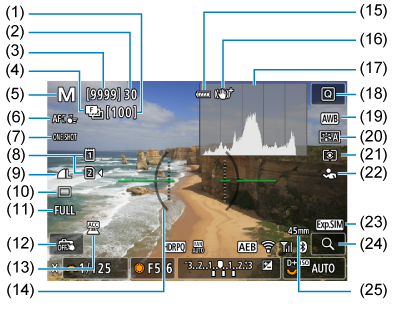
- (1) Фокус брекетингі үшін қалған түсірілімдер саны
- (2) Максималды жарқыл
- (3) Қолжетімді түсірілімдер саны/өздігінен түсіруді реттейтін таймер түсіргенше секунд
- (4) Фокус брекетингі/HDR режимі/алдын ала үздіксіз түсіру
- (5) Түсіру режимі
- (6) AF аймағы
- (7) AF операциясы
- (8) Карта
- (9) Сурет сапасы
- (10) Жетек режимі
- (11) Фотосуретті қиып алу/пропорция
- (12) Сенсорлы ысырма/қалта жасау
- (13) Керек-жарақ бекітілген индикатор
- (14) Электронды деңгей
- (15) Батарея деңгейі
- (16) Image Stabilizer (Сурет тұрақтандырғышы (IS режимі))
- (17) Гистограмма (ашықтық/RGB)
- (18) Жылдам басқару түймесі
- (19) Ақ түс балансы/Ақ түс балансын түзету
- (20) Picture Style/түс сүзгісі
- (21) Өлшеу режимі
- (22) Анықталатын нысан
- (23) Дисплей симуляциясы
- (24) Үлкейту түймесі
- (25) Фокустау ұзындығы
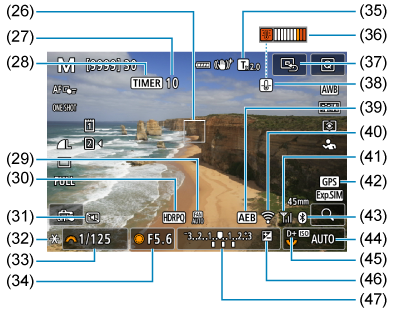
- (26) AF нүктесі (1-нүктелі AF)
- (27) Қалған аралық таймері түсірілімдерінің саны
- (28) Аралық таймерімен суретке түсіру
- (29) Желдеткіш параметрлері
- (30) HDR түсіру (PQ)/Қарау көмекшісі дисплейі
- (31) Тыныш ысырма функциясы
- (32) AE құлпы
- (33) Ысырма жылдамдығы
- (34) Апертура мәні
- (35) Сандық телеконвертер
- (36) Қатты қызып кетуді ескерту
- (37) AF нүктесін ортаға орнату
- (38) Фотосуреттің сурет сапасын ескерту
- (39) AEB
- (40) Wi-Fi функциясы
- (41) Wi-Fi сигналының күші/ұшақ режимі
- (42) GPS қосылымының күйі
- (43) Bluetooth функциясы
- (44) ISO көрсеткiшi
- (45)Ашық реңк артықшылығы
- (46) Экспозиция компенсациясы
- (47) Экспозиция деңгейінің көрсеткіші (экспозиция компенсациясының шамасы/AEB ауқымы)
Фильм жазу экраны
түймесі басылған сайын ақпарат дисплейі өзгереді.
- Дисплей ағымда қолданылған параметрлерді ғана көрсетеді.
Күту режимі
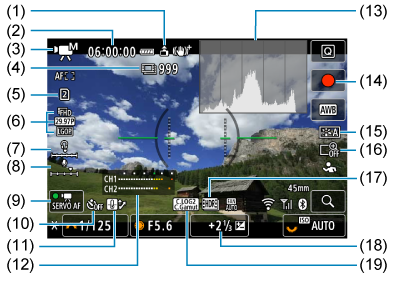
Фильм жазу орындалуда
- (1) Фильмдерге қосылған бағдар ақпараты
- (2) Фильм жазу уақыты қолжетімді
- (3)Түсіру режимі
- (4) Жазуға болатын фильмдер саны
- (5) Жазу/ойнату үшін карта
- (6) Фильм жазу өлшемі
- (7) Құлаққаптың дыбыс деңгейі
- (8)Дыбыс жазу деңгейі (қолмен енгізу)
- (9) Фильмнің Servo AF нүктесі
- (10) Фильмнің өздігінен түсіруді реттейтін таймері
- (11) Қатты қызуды басқару
- (12) Дыбыс жазу деңгейінің көрсеткіші
- (13) Ашықтық ақпараты (гистограмма/толқын пішіні мониторы)
- (14) Фильм түсіру түймесі (жазуды бастау)
- (15) Picture Style/түс сүзгісі/өзгертпелі сурет
- (16) Сандық үлкейту
- (17) HDR фильмін жазу/Қарау көмекшісі
- (18) Экспозиция деңгейінің көрсеткіші (өлшеу деңгейлері)
- (19) Гамма/Түстік кеңістік
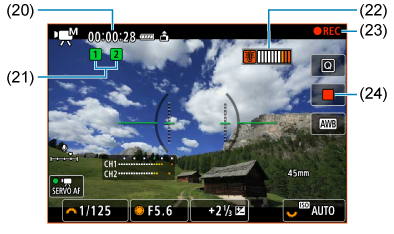
- (20) Өткен жазу уақыты
- (21) Жазу күйі (сол жақ: негізгі фильм, оң жақ: прокси фильмі)
- (22) Қатты қызып кетуді ескерту
- (23) Фильм жазу орындалуда
- (24) Фильм түсіру түймесі (жазуды тоқтату)
- Қаррапайымдылық үшін осы жерде көрсетілмеген Фотосуретке түсіру экраны бөлімінде де қамтылған элементтер үшін түсіндірмелер берілмейді.
Ескерту
- түймесін басуға жауап ретінде көрсетілетін ақпаратты көрсетуіңізге болады ().
- Электронды деңгей камера HDMI арқылы теледидарға қосылғанда көрсетілмейді.
- Тор мен гистограмманы фильм жазу кезінде көрсету мүмкін емес (және олар қазір көрсетіліп тұрса, фильм жазу дисплейді тазалайды).
- Фильм жазу басталған кезде фильм жазудың қалған уақыты өткен уақытқа ауысады.
Ескертпе
- Басқа белгішелер реттеулерді орнатқаннан кейін уақытша көрсетілуі мүмкін.
Көрініс белгішелері
Режим дискісі  режиміне орнатылып тұрғанда, камера көрініс түрін анықтайды және барлық параметрлерді сәйкесінше орнатады. Анықталған көрініс түрі экранның жоғарғы сол жағында көрсетіледі.
|
Нысан Өң |
Адамдар*1 | Адамдардан басқа нысандар | Өң түсі | ||||
|---|---|---|---|---|---|---|---|
| Қозғ-та*2 | Табиғат/сыртқы көрініс | Қозғ-та*2 | Жабық*3 | ||||
| Ашық |  |
 |
 |
 |
 |
Сұр | |
| Артқы жарық |  |
 |
 |
 |
 |
||
| Көк аспан қосылады |  |
 |
 |
 |
 |
Көгілдір | |
| Артқы жарық |  |
 |
 |
 |
 |
||
| Күннің батуы | *4 |  |
*4 | Қызғылт сары | |||
| Прожектор |  |
 |
 |
Қою көк | |||
| Күңгірт |  |
 |
 |
||||
| Мосымен*1 |  *5*6 *5*6 |
*4 |  *5*6 *5*6 |
*4 | |||
- 1: Адамдардан басқа нысандарға арналған белгіше адамдар анықталса да уақыт үзілісі бар фильмдер жазуда көрсетіледі.
- 2: Фильм жазу кезінде көрсетілмейді.
- 3: Тіркелген объективтің қашықтық ақпараты бар кезде көрсетіледі. Кеңейтім трубкасы не жақыннан түсіру объективімен көрсетілген белгіше нақты көрініспен сәйкес келмеуі мүмкін.
- 4: Анықтауға болатындардан таңдалған көріністер белгішелері көрсетіледі.
- 5: Барлық келесі жағдайлар қолданылған кезде көрсетіледі.
Түсіру көрінісі күңгірт, түнгі көрініс және камера мосыға орнатылған. - 6: Келесі объективтердің кез келгенімен көрсетіледі.
- EF300mm f/2.8L IS II USM
- EF400mm f/2.8L IS II USM
- EF500mm f/4L IS II USM
- EF600mm f/4L IS II USM
- 2012 жылы және одан кейін шығарылған Image Stabilizer (Сурет тұрақтандырғышы).
- Жай ысырма жылдамдығы *5 және *6-шы тармақтағы жағдайлар қолданылған кезде пайдаланылады.
Ескертпе
- Белгілі бір көріністер мен түсіру жағдайлары үшін, көрсетілген белгіше нақты көрініске сәйкес келмеуі мүмкін.
Ойнату экраны
түймесі басылған сайын ақпарат дисплейі өзгереді.
- Дисплей ағымда қолданылған параметрлерді ғана көрсетеді.
Фотосуреттер үшін негізгі ақпарат дисплейі
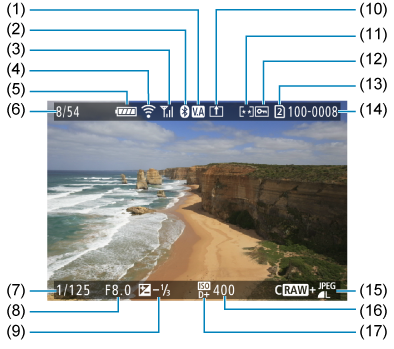
- (1) HDR қарау көмекшісі
- (2) Bluetooth функциясы
- (3) Сымсыз сигнал күші
- (4) Wi-Fi функциясы
- (5) Батарея деңгейі
- (6) Ағымдағы сурет саны/барлық суреттер/табылған суреттер саны
- (7) Ысырма жылдамдығы
- (8) Апертура мәні
- (9) Экспозиция компенсациясының шамасы.
- (10) Компьютерге/смартфонға жіберіліп қойған
- (11) Суретті бағалау функциясы
- (12) Суретті қорғау
- (13) Карта нөмірі
- (14) Қалта нөмірі-Файл нөмірі
- (15) Сурет сапасы/өңделген сурет/қиып алу/кадр алу
- (16) ISO көрсеткiшi
- (17) Ашық реңк артықшылығы
Ескерту
- Егер сурет басқа камерамен түсірілген болса, белгілі бір түсіру ақпараты көрсетілмейді.
- Осы камерамен түсірілген суреттерді басқа камераларда ойнату мүмкін емес.
Фотосуреттер үшін толық ақпарат дисплейі 1
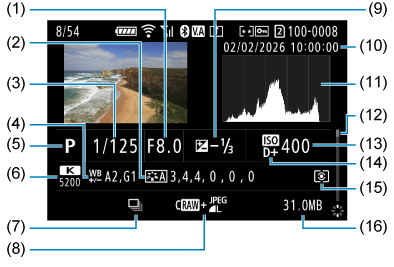
- (1) Апертура мәні
- (2) Picture Style (сурет сипаттамалары/параметр мәліметтері)
- (3) Ысырма жылдамдығы
- (4) Ақ түс балансын түзету/брекетинг
- (5) Түсіру режимі (Кадрды алу)
- (6) Ақ түс балансы
- (7) Көріністің бірінші суреті
- (8) Сурет сапасы/өңделген сурет/қиып алу
- (9) Экспозиция компенсациясының шамасы.
- (10) Түсіру күні мен уақыты
- (11) Гистограмма (ашықтық/RGB)
- (12) Айналдыру жолағы
- (13) ISO көрсеткiшi
- (14) Ашық реңк артықшылығы
- (15) Өлшеу режимі
- (16) Файл өлшемі
- Қарапайымдылық үшін түсіндірмелер осы жерде көрсетілмеген Фотосуреттер үшін негізгі ақпарат дисплейі бөлімінде қамтылатын элементтер үшін қосылмаған.
- RAW+JPEG/HEIF суретін түсіруде түсірілген суреттер үшін RAW файл өлшемдерін білдіреді.
- Сурет аймағын көрсететін объективтер пропорциялары орнатылып() және сурет сапасы үшін RAW немесе RAW+JPEG орнатылып түсірілген суреттер үшін көрсетіледі.
- Қосылған қиып алу ақпараты бар суреттер қиып алынып көрсетіледі.
- [
 ] уақыт үзілісі бар фильмдер үшін сынақ түсірілімдерін білдіреді.
 - [
 ] RAW кескінін өңдеу, өлшемін өзгерту, қиып алу, HEIF суретін JPEG суретіне түрлендіру немесе кадр алу әрекеттерін орындау арқылы жасалған және сақталған суреттерді білдіреді.
 - [
 ] қиып алынып, сақталған суреттерді білдіреді.
 - JPEG суреттеріне түрлендірілген HEIF суреттері [
 ] белгішесімен белгіленеді.
Фотосуреттер үшін толық ақпарат дисплейі 2
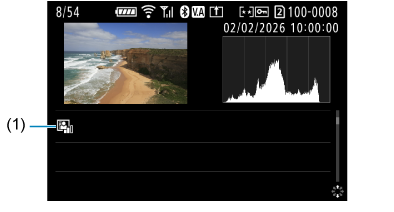
- (1) Auto Lighting Optimizer (Авто жарықтылықты оңтайландырғыш)
- Қарапайымдылық үшін түсіндірмелер осы жерде көрсетілмеген Фотосуреттер үшін негізгі ақпарат дисплейі және Фотосуреттер үшін толық ақпарат дисплейі 1 бөлімдерінде де қамтылатын элементтер үшін қосылмаған.
Фильмдер үшін негізгі ақпарат дисплейі
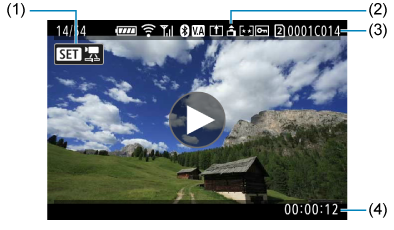
- (1) Фильмді ойнату
- (2) Фильм бағдарын өзгерту ақпараты
- (3) Рил және клип нөмірлері
- (4) Жазу уақыты/уақыт коды
- Қарапайымдылық үшін түсіндірмелер осы жерде көрсетілмеген Фотосуреттер үшін негізгі ақпарат дисплейі бөлімінде де қамтылатын элементтер үшін қосылмаған.
Фильмдер үшін толық ақпарат дисплейі 1
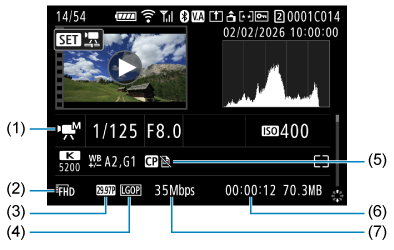
- (1) Түсіру режимі
- (2) Фильм жазу өлшемі
- (3) Кадр жиілігі
- (4) Қысу әдісі
- (5) Picture Style (сурет сипаттамасы/параметр мәліметтері)/түс сүзгісі/өзгертпелі сурет
- (6) Жазу уақыты/уақыт коды
- (7) Фильмнің бит жиілігі
- Қарапайымдылық үшін түсіндірмелер осы жерде көрсетілмеген Фотосуреттер үшін негізгі ақпарат дисплейі, Фотосуреттер үшін толық ақпарат дисплейі 1 және Фильмдер үшін негізгі ақпарат дисплейі бөлімдерінде де қамтылатын элементтер үшін қосылмаған.
- Түсіру (сол жақта) және ойнату (оң жақта) барысында баяу/жылдам қимылды фильмнің кадр жиілігі көрсетіліп тұрады.
Ескертпе
- Фильмді ойнатып жатқан кезде, Picture Styles мәзіріндегі [Sharpness/Анықтық] тармағының [Fineness/Дәлдік] және [Threshold/Шек] параметрлері [*, *] ішіндегідей көрсетіледі.
Фильмдер үшін толық ақпарат дисплейі 2
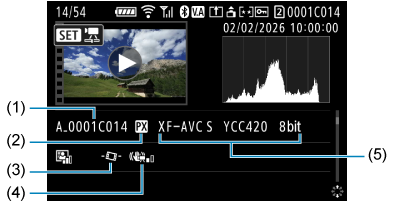
- (1) Фильмнің файл атауы
- (2) Прокси фильмі
- (3) Фильмнің автодеңгейі
- (4) Image Stabilizer (Сурет тұрақтандырғышы) (Сандық фильм IS)
- (5) Фильм жазу пішімі
- Қарапайымдылық үшін түсіндірмелер осы жерде көрсетілмеген Фотосуреттер үшін негізгі ақпарат дисплейі, Фотосуреттер үшін толық ақпарат дисплейі 1, Фотосуреттер үшін толық ақпарат дисплейі 2, Фильмдер үшін негізгі ақпарат дисплейі және Фильмдер үшін толық ақпарат дисплейі 1 бөлімдерінде де қамтылатын элементтер үшін қосылмаған.