
Exporting
Clips are exported as VR/3D images.
- We recommend using a computer with a GPU compatible with this application.
- To use the GPU for exporting, select the GPU name in [Processor] in the [Tools] menu (Windows) or [Processor] in the [EOS VR Utility] menu (macOS).
-
Click [Export...].
- Exporting is also possible by selecting [Export] in the [File] menu.
-
Configure the settings as needed in the dialog box, then click [Export].
- In [VR Format], select an option for how you will use the clip.
Still photos
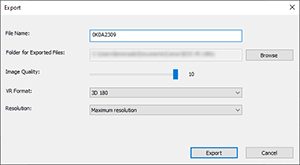
- Image quality of exported still photos can be adjusted in [Image Quality]. Set to [10] to save at the highest image quality.
Movies
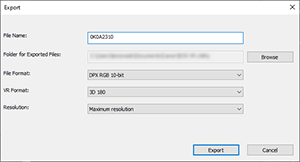
- To apply Neural Network Upscaling, select the check box.
- Neural Network Upscaling is available in the following operating systems and environments.
- Windows: After you select your GPU (as listed in [Tools] > [Processor] on computers equipped with an Nvidia RTX-series GPU)
- macOS: After you select your GPU (as listed in [EOS VR Utility] > [Processor] on Mac computers with Apple silicon)
- Neural Network Upscaling is available for the following video clips.
- Combination of lens and camera:
- MP4 (not available for CRM or JPEG)
- Recorded normally (not available for clips from Time-lapse movie recording, slow/fast motion recording, or Frame Recording/Interval Recording)
- Resolution: 4K DCI (4096×2160) or 4K UHD (3840×2160)
- The check box is available under these conditions.
- [Size (pixel)] is set to [8192×4096] or [8192×8192]
RF5.2mm F2.8 L DUAL FISHEYE EOS R6 Mark III EOS R6 Mark II EOS C400 EOS C80 EOS C50 RF-S3.9mm F3.5 STM DUAL FISHEYE EOS R7 EOS R50 V EOS R50
Caution
- When multiple clips are selected, Neural Network Upscaling is only applied to clips that meet the requirements for this processing. It is not applied to incompatible clips.
- For best results from Neural Network Upscaling use high-resolution source clips. Record in 4K Fine if your camera has this option.
- The effect of Neural Network Upscaling may not look as expected for images from some shooting situations. Exporting takes longer than usual when Neural Network Upscaling is applied.
Note
- “Exporting with neural network upscaling” is displayed during processing when Neural Network Upscaling is applied.
- For details on GPUs compatible with this application, visit the Canon website.
- You can specify multiple clips to export.
- Exporting in HEVC (4:4:4) or ProRes format is recommended if you will use nonlinear editing (NLE) software.
- Exported file sizes vary depending on clip resolution.
- In Windows, file format options include HEVC 4:4:4 10-bit/MP4/VR180.
- In macOS, file format options include Apple ProRes/MOV/APMP and MV-HEVC/MOV/APMP.