
Shutter Mode
You can choose the method of shutter release.
-
Select an option.
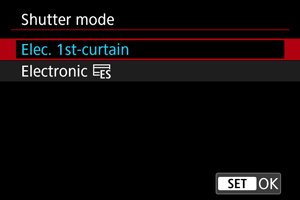
-
Elec. 1st-curtain
Electronic shutter is used for first curtain and mechanical for the second.
-
Electronic

Enables reduced sound and vibration from shutter operations, compared to electronic first-curtain.
Recommended when shooting with the aperture of a bright lens wide open.
Maximum shutter speed can be set higher than for electronic first-curtain.
- With [
 ] or [
 ], a white frame blinks on the screen when you press the shutter button completely.
 - Shutter operations are accompanied by beeps. You can disable beeping in [
 : Beep].
- With [
-
Caution
-
With the camera set to [Elec. 1st-curtain], defocused image areas may be incomplete when you shoot near maximum aperture at high shutter speeds under some shooting conditions. If you dislike the appearance of defocused image areas, shooting as follows may give better results.
- Shoot with an option other than [Elec. 1st-curtain].
- Lower the shutter speed.
- Increase the aperture value.
- Setting [
 : Silent shutter function] to [On] sets the shutter mode to [Electronic ].
 - With some lenses, zooming during continuous shooting may cause changes in exposure even at the same f/number. For details, refer to the Canon website ().
-
Precautions when set to [Electronic
] - The continuous shooting speed may become slower depending on the shooting conditions.
- Images may lack suitable exposure if the aperture value changes in P (Program AE) mode, Tv (Shutter-priority AE) mode, or Fv (Flexible-priority AE) mode.
- With some lenses and under some shooting conditions, lens focusing and aperture adjustment may be audible.
- Bands of light may be displayed and captured images may be affected by light and dark banding if you shoot with electronic shutter during flash firing by other cameras or under fluorescent lighting or other flickering light sources.
- Banding may appear in the viewfinder or on the screen if you shoot under flickering light sources.