
Adjusting the Angle of the Camera Mount
Adjusting the Tilt of the Camera Mount
-
Hold the front/back lock release button pressed.
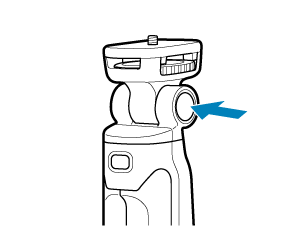
-
Tilt the camera mount.
- The camera mount can be locked every 15°.
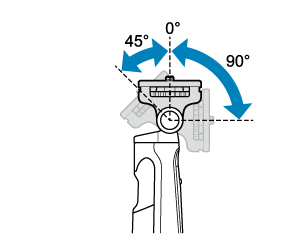
-
Release the front/back lock release button.
- Check that the camera mount is locked.
Camera Mount Turning
-
Hold the left/right lock release button pressed.
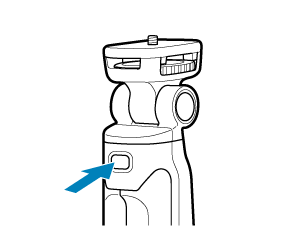
-
Turn the camera mount.
- The camera mount can be locked every 90°.
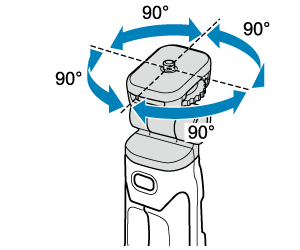
-
Release the left/right lock release button.
- Check that the camera mount is locked.
Caution
- If the camera is attached on the camera mount, hold the camera before adjusting the tilt of the camera mount or turning it to avoid pinching your finger or dropping the camera.
- Before changing the front/back or left/right rotation angle, make sure your fingers are not obstructing movement to avoid pinching them.