
Part Names
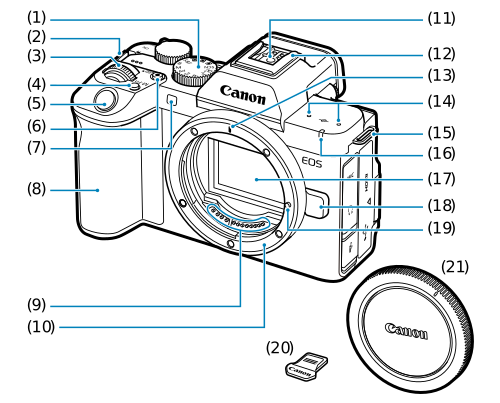
- (1) Mode dial
- (2) Strap mount
- (3)
 Main dial
 - (4)
 Multi-function button
 - (5) Shutter button
- (6) Movie shooting/
 movie-photo playback toggle button
 - (7) Self-timer lamp/AF-assist beam
- (8) Grip (battery compartment)
- (9) Contacts
- (10) Lens mount
- (11) Flash sync contacts
- (12) Multi-function shoe
- (13) RF lens mount index
- (14) Microphone
- (15) Strap mount
- (16) Tally lamp
- (17) Image sensor
- (18) Lens release button
- (19) Lens lock pin
- (20) Shoe cover
- (21) Body cap
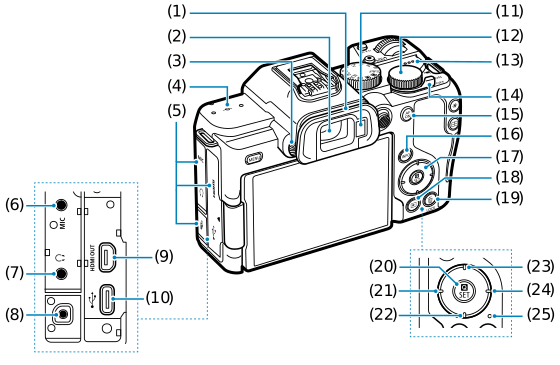
- (1) Eyecup
- (2) Viewfinder eyepiece
- (3) Dioptric adjustment knob
- (4)
 Focal plane mark
 - (5) Terminal cover
- (6)
 External microphone IN terminal
 - (7)
 Headphone terminal
 - (8)
 Remote control terminal
 - (9)
 HDMI OUT terminal
 - (10)
 Digital terminal
 - (11) Viewfinder sensor
- (12)
 Quick control dial
 - (13) Speaker
- (14)
 /
/ /
/ Power switch
 - (15)
 AF start button
 - (16)
 Info button
 - (17)
 Cross keys
 - (18)
 Playback button
 - (19)
 /
/ Multi-function lock/erase button
 - (20)
 Quick Control/Set button
 - (21)
 Left button
 - (22)
 Down button
 - (23)
 Up button
 - (24)
 Right button
 - (25) Access lamp
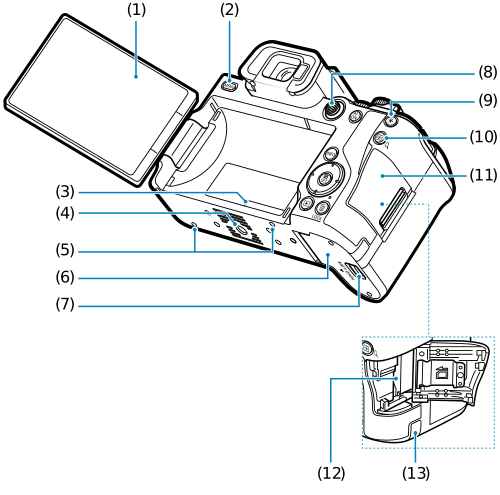
- (1) Screen
- (2)
 Menu button
 - (3) Serial number (body number)
- (4) Tripod socket
- (5) Accessory positioning hole
- (6) Battery compartment cover
- (7) Battery compartment cover lock
- (8)
 Multi-controller (can also be pressed straight in)
 - (9)
 AE lock button
 - (10)
 /
/ AF point selection/index/magnify/reduce button
 - (11) Card slot cover
- (12) Card slot
- (13) DC cord hole
Mode dial
The Mode dial is divided into Basic Zone and Creative Zone modes.
In Basic Zone modes, the camera determines optimal settings for the subject or scene. In Creative Zone modes, you can shoot with your preferred exposure or other settings.
(1) Basic Zone
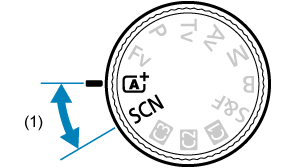
(2) Creative Zone / (3) Custom shooting mode
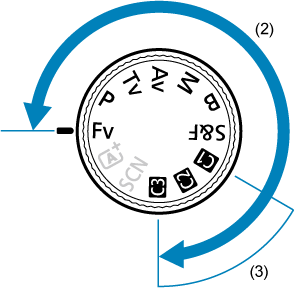
Mode dial and shooting modes
| Mode Dial | Shooting Mode | |||
|---|---|---|---|---|
 Still Photo Shooting Still Photo Shooting |
Movie Recording |
|||
| Basic Zone |  |
Scene Intelligent Auto | Scene Intelligent Auto movie | |
|
Special scene |
Portrait | Panning | ||
| Smooth skin | Close-up | |||
| Group photo | Food | |||
| Landscape | Night portrait | |||
| Panoramic shot | Handheld night scene | |||
| Sports | HDR backlight control | |||
| Kids | Silent shutter | |||
| Creative Zone | Fv | Flexible-priority AE | Movie auto exposure | |
| P | Program AE | |||
| Tv | Shutter-priority AE | Movie shutter-priority AE | ||
| Av | Aperture-priority AE | Movie aperture-priority AE | ||
| M | Manual exposure | Movie manual exposure | ||
| B | Long (bulb) exposures | Movie auto exposure | ||
 |
Program AE | Slow/fast motion movie | ||
|
Custom shooting mode |
Custom shooting | Custom movie recording | ||


Battery Charger LC-E17 (sold separately)
Charger for Battery Pack LP-E17 ().
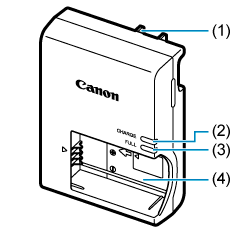
- (1) Power plug
- (2) Charge lamp
- (3) Full-charge lamp
- (4) Battery slot
Battery Charger LC-E17E (sold separately)
Charger for Battery Pack LP-E17 ().
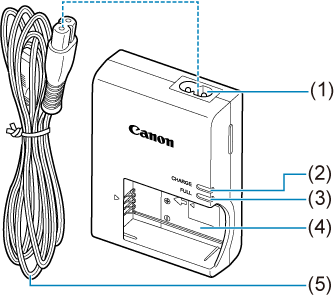
- (1) Power cord socket
- (2) Charge lamp
- (3) Full-charge lamp
- (4) Battery slot
- (5) Power cord
Attaching the Strap
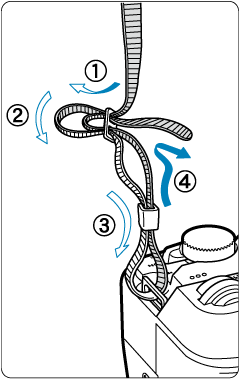
Pass the end of the strap through the strap mount from the bottom, then pass it through the strap buckle as shown. Pull the strap to take up any slack and make sure the strap will not loosen from the buckle.