
Movie Recording
Movie recording can be performed by pressing the movie shooting button on the remote control.
-
Connect the remote control to the camera.
-
Set the remote control.
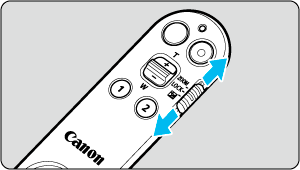
- Set the zoom/lock/exposure compensation switch to a position other than
 .
.
- Set the zoom/lock/exposure compensation switch to a position other than
-
Press the movie shooting button.
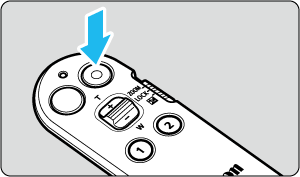
- The indicator on the remote control will light up once and movie recording will begin.
- Pressing the movie shooting button again will cause the indicator on the remote control to blink twice and movie recording will stop.
Caution
- The operation sounds of the remote control may be recorded.