
Shooting with Speedlites
- EL/EX Series Speedlites for EOS Cameras
- Canon Speedlites Other Than the EL/EX Series
- Non-Canon Flash Units
- Quick Flash Group Control
- FE Memory Function
EL/EX Series Speedlites for EOS Cameras
Features of EL/EX series Speedlites (sold separately) can be used in flash photography with the camera.
For instructions, refer to the EL/EX series Speedlite's Instruction Manual.
Sync speed
Synchronization at up to 1/60 sec. is supported.
Flash exposure compensation
You can adjust flash output (flash exposure compensation). With an image displayed on the screen, press the  button and use a dial to set the amount of flash exposure compensation (). You can set the flash exposure compensation up to ±3 stops in 1/3-stop increments.
FE Lock
This enables you to obtain appropriate flash exposure for a specific part of the subject. To activate FE lock, center the subject on the screen and press the button assigned to FE lock. After this, compose the shot and take the picture.
Caution
- Some Speedlites cannot be attached directly to this camera. For details, see Multi-Function Shoe.
- Setting [
 : Auto Lighting Optimizer] () to an option other than [Disable] may still cause images to look bright even if you set lower flash exposure compensation for darker images.
Note
- You can also set flash exposure compensation on the Quick Control screen () or in the [Flash function settings] setting of [: External Speedlite control] ().
- The camera can turn on certain Speedlites automatically when the camera is turned on. For details, refer to the instruction manual of Speedlites that support this feature.
Canon Speedlites Other Than the EL/EX Series
-
With an EZ/E/EG/ML/TL series Speedlite set to A-TTL or TTL autoflash mode, the flash can be fired at full output only.
Set the camera shooting mode to M or Av and adjust the aperture value before shooting.
- When using a Speedlite that has manual flash mode, shoot in the manual flash mode.
Non-Canon Flash Units
Sync speed
Before shooting with compact flash units, confirm that flash sync is performed correctly by taking some test shots at a sync speed of up to approx. 1/60 sec.
With large studio flash units, the flash duration is longer than that of a compact flash unit and varies depending on the model. Before shooting, confirm that flash sync is performed correctly by taking some test shots at a sync speed of approx. 1/30 sec. to 1/20 sec.
Quick Flash Group Control
As you view the shooting screen in wireless multi-flash photography, you can configure the settings for each flash group by pressing the button assigned to [Quick flash group control] in [ : Customize buttons for shooting]. This example is based on assigning the button ().
-
Set the flash firing mode to
 (individual group control) to prepare for wireless multi-flash photography.
- For details, refer to the instruction manuals of flash units supporting wireless multi-flash photography.
-
During standby, press the
button.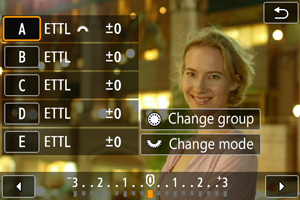
- Settings (flash mode and flash exposure compensation) for each flash group are displayed.
- Turn the
 dial to select a flash group (A–E) to configure.
 - Turn the
 dial to set the flash mode.
 - Turn the
 dial to adjust flash output or flash exposure compensation.
Note
- The [Quick flash group control] setting screen can be displayed in Fv, P, Tv, Av, or M mode.
- When Speedlites are set to a flash mode other than (individual group control), pressing the button displays the [Flash function settings] screen.
FE Memory Function
You can set the flash output captured in [ETTL] flash mode as the flash output for [M] flash mode by pressing the button assigned to [ETTL  M (with FEM enabled)] in [: Customize buttons for shooting]. This example is based on assigning the button ().
-
Set the camera FE memory function.
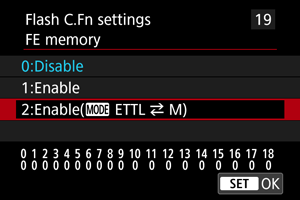
-
Shoot with the flash mode set to [ETTL].
- Press the shutter button completely to take the picture.
-
During standby, press the
button.- The flash mode switches to [M] and the flash output captured in step 2 is displayed.
- Pressing the button again after shooting in [M] flash mode switches the mode to [ETTL] and displays the flash exposure compensation amount.
- To change the flash output or the flash exposure compensation, perform operations with the flash or set with [Flash function settings] ().
 ETTL
ETTL Note
- The FE memory function is available in P, Tv, Av, and M modes.
- Pressing the button does not switch flash modes on Speedlites currently in a mode other than [ETTL] or [M].