
Attaching a Camera
Insert the battery and memory card into the camera. Make sure the camera is turned off before attaching the camera.
Horizontal Shooting
- Set the camera monitor and the BR-E2 button panel in the same orientation, and then insert the tripod screw in the tripod socket on the camera (1).
- Turn the attach/detach dial to lock the camera (2).
-
Attach the camera securely so that it does not detach from the mount.
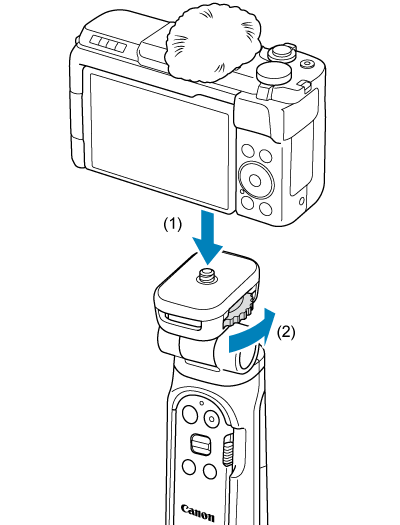
- To remove the camera, reverse the order.
Vertical Shooting
Note
- If your model has a tripod socket for vertical shooting, you can perform vertical shooting by attaching the camera vertically.
-
Attach the camera to the camera mount.
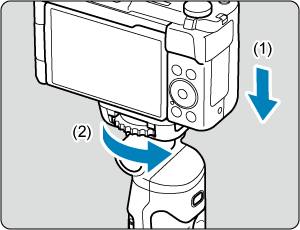
- Set the camera monitor and tripod leg R in the same orientation, and then insert the tripod screw into the tripod socket on the camera (1).
- Turn the attach/detach dial to lock the camera (2).
- Attach the camera securely so that it does not detach from the camera mount.
-
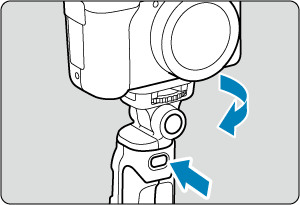
Turn the camera mount.
- While holding the left/right lock release button, turn the camera mount so that the camera monitor and the BR-E2 button panel are facing the same direction.
-
Tilt the camera mount.
-
Tilt the camera mount 90° while holding the front/back lock release button.
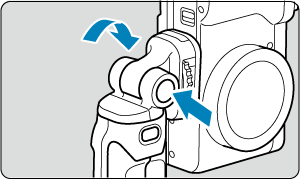
- To remove the camera, reverse the order.
-