
Indstillinger for køleblæser
Du kan bruge køleblæseren for at fjerne varmen inde i kameraet.
-
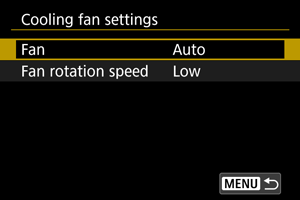
Vælg [Ventilator].
-
Auto
Under streaming eller filmoptagelse forbliver blæseren tændt på det niveau, der er indstillet i [Ventilatorhastighed].
I andre tilfælde skifter hastigheden automatisk til [Høj] som reaktion på en højere indvendig temperatur.
-
Til
Blæseren forbliver tændt med den hastighed, der er indstillet i [Ventilatorhastighed].
-
Fra
Holder blæseren slukket.
-
-
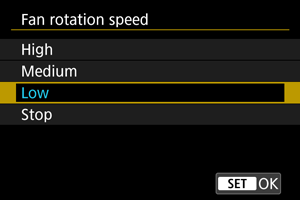
Vælg [Ventilatorhastighed].
-
Blæseren roterer i henhold til hastighedsindstillingen.
Højere hastigheder medfører mere mekanisk støj i optagelserne.
-
 :
: Forholdsregler
- Der kommer varm luft ud af udluftningsventilen, mens køleblæseren er tændt.
- Pas på ikke at dække tilgangsventilen eller udluftningsventilen med dine fingre eller tape osv.
- Batterilevetiden er kortere, når [Ventilatorhastighed] er indstillet til [Høj] eller [Mellem].
- Under visse optagelsesforhold kan blæsestøjen være hørbar i de film, du optager. I så fald kan det hjælpe at bruge en ekstern mikrofon, der er placeret væk fra blæseren, for at dæmpe denne støj.
- Ændringer i blæserhastigheden kan være hørbare ved visse blæserindstillinger, når du starter optagelsen efter at have været i standbytilstand.
Bemærk
- I varme optagelsesmiljøer og lignende forhold kan blæseren fortsætte med at køre, selvom den er indstillet til [Auto].