
Избор на метод на снимане
Фотоапаратът предлага следните методи на снимане: Единични снимки и Серия от снимки. Можете да изберете подходящия за сцената или обекта метод на снимане.
-
Натиснете бутона
 (
( ).
).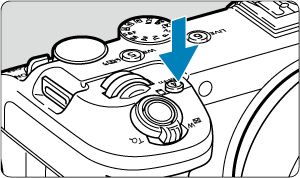
- При показано на екрана изображение натиснете бутона .
- При показано на екрана изображение натиснете бутона
-
Изберете елемента за метод на снимане.
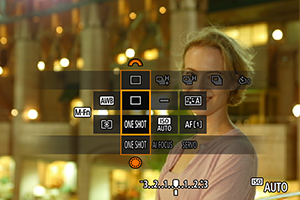
- Натиснете бутона , за да изберете елемента за метод на снимане.
- Натиснете бутона
-
Изберете метод на снимане.
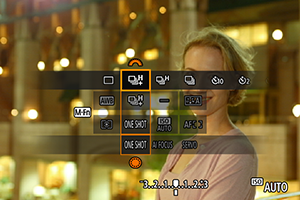
- Завъртете селектора
 , за да зададете настройка.
- Завъртете селектора
-
 : Единични снимки
Когато натиснете спусъка докрай, ще се заснеме само една снимка.
-
 : Високоскоростна серия от снимки +
Докато държите спусъка натиснат докрай, можете да заснемете серия от снимки при максимална честота приблиз. 40 снимки/s.
-
 : Високоскоростна серия от снимки
Докато държите спусъка натиснат докрай, можете да заснемете серия от снимки при максимална честота приблиз. 20 снимки/s.
-
 : Нискоскоростна серия от снимки
Докато държите спусъка натиснат докрай, можете да заснемете серия от снимки при максимална честота приблиз. 5,0 снимки/s.
-
 : Самоснимачка: 10 s /
  : Самоснимачка: 2 s /
  : Самоснимачка: серия от снимки
За подробности относно снимането със самоснимачка вижте „Използване на самоснимачката“ ().
Внимание
-
Ако зададете за метод на снимане [
], можете да заснемете серия от снимки при честота приблиз. 40 снимки/s при посочените по-долу условия.- Скорост на затвора: 1/40 s или по-висока
Имайте предвид, че честотата на заснемане на серия от снимки може да е по-ниска от 40 снимки/s, ако по време на заснемането на серия от снимки възникне някое от посочените по-долу обстоятелства.
- Превключване към режим на снимане P или Tv или прилагане на настройки, които променят отвора на диафрагмата в режим Fv
- Използване на вариото
- Извършване на ръчно фокусиране
- Функцията „Следящ AF“ променя позицията на фокуса
- Използване на източник на захранване, различен от батерия LP-E6P или DC съединител DR-E6P
- Честотата на заснемане на серия от снимки може да се намали в зависимост от фактори като заряд на батерията, температура, скорост на затвора, отвор на диафрагмата, условия на обекта, яркост, AF функция, тип обектив и настройки за снимане.
- Посетете уебсайта на Canon за повече информация относно обективите, поддържащи максималната честота на заснемане на серия от снимки ().
- Честотата на заснемане на серия от снимки с функцията "Следящ AF" може да се намали в зависимост от условията на обекта или използвания обектив.
- Ако снимате при пулсиращ източник на светлина, честотата на заснемане на серия от снимки може да се намали.
- Когато вътрешната памет се запълни при заснемане на серия от снимки, честотата на серията от снимки може да се понижи, тъй като снимането ще бъде временно забранено ().
- Честотата на заснемане на серия от снимки може да се понижи, а показването на изображението може да се прекрати при някои условия на снимане.
Забележка
- Честотата на заснемане на серия от снимки, посочена за всеки метод на снимане, е честотата при фабрични настройки на фотоапарата.