
تحديد وضع التشغيل
يتم توفير أوضاع التشغيل المنفردة والمستمرة. يمكنك تحديد وضع التشغيل الذي يناسب المشهد أو الهدف.
-
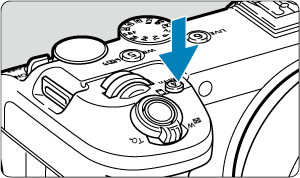
اضغط على الزر
 (
( ).
).
- أثناء عرض إحدى الصور على الشاشة، اضغط على زر .
- أثناء عرض إحدى الصور على الشاشة، اضغط على زر
-
حدد عنصر وضع التشغيل.
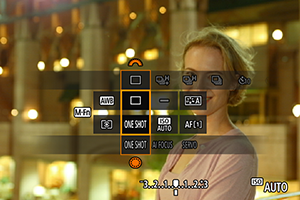
- اضغط على زر لتحديد عنصر وضع التشغيل.
- اضغط على زر
-
حدد وضع التشغيل.
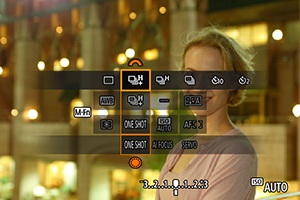
- أدر القرص
 للقيام بالتحديد.
- أدر القرص
-
 : التصوير المنفرد
عندما تضغط باستمرار على زر الغالق تمامًا، سيتم التقاط صورة واحدة فقط.
-
 : التصوير المستمر عالي السرعة +
عند الضغط مع الاستمرار على زر الغالق كليًا، يمكنك التصوير بشكل مستمر وبحد أقصى ٤٠ لقطة في الثانية تقريبًا، ولكن يجب الاستمرار في الضغط.
-
 : التصوير المستمر عالي السرعة
عند الضغط مع الاستمرار على زر الغالق كليًا، يمكنك التصوير بشكل مستمر وبحد أقصى ٢٠ لقطة في الثانية تقريبًا، ولكن يجب الاستمرار في الضغط.
-
 : التصوير المستمر منخفض السرعة
عند الضغط مع الاستمرار على زر الغالق كليًا، يمكنك التصوير بشكل مستمر وبحد أقصى ٥.٠ لقطة في الثانية تقريبًا، ولكن يجب الاستمرار في الضغط.
-
 : مصباح مؤقت: لمدة ١٠ ثوانٍ /
  : مصباح مؤقت: ثانيتان /
  : مؤقت ذاتي: التصوير المستمر
للاطّلاع على التفاصيل حول التصوير بالمؤقت الذاتي، راجع استخدام المؤقت الذاتي ().
تنبيه
-
يتيح ضبط وضع التشغيل على [
] في ظل الظروف المذكورة لسرعة التصوير المستمر بسرعة ٤٠ لقطة في الثانية تقريبًا.- سرعة الإغلاق: 1/40 ثانية أو أسرع
لاحظ أن سرعة التصوير المستمر قد تكون أقل من ٤٠ لقطة في الثانية في حالة حدوث أي مما يلي أثناء التصوير المستمر.
- التبديل إلى وضع التصوير P أو Tv، أو تطبيق الإعدادات التي تؤدي إلى تغيير قيمة ضبط العدسة في وضع Fv
- يُنفذ التكبير/التصغير
- يُنفذ التركيز البؤري اليدوي
- يعمل Servo AF على تغيير الموضع للتركيز
- يتم استخدام مصدر طاقة بخلاف حزمة البطارية LP-E6P أو وصلة التيار المباشر DR-E6P
- قد تؤدي عوامل مختلفة إلى خفض سرعة التصوير المستمر، مثل مستوى شحن البطارية، ودرجة الحرارة، وسرعة الإغلاق، وقيمة ضبط العدسة، وظروف الهدف، والسطوع، وتشغيل ضبط البؤرة تلقائيًا، ونوع العدسة، وإعدادات التصوير.
- قم بزيارة موقع Canon الإلكتروني للحصول على تفاصيل حول العدسات التي تدعم السرعة القصوى للتصوير المستمر ().
- ربما تكون سرعة التصوير المستمر للصور مع Servo AF أبطأ وفقًا لظروف الهدف أو العدسة المستخدمة.
- عند التصوير في ظل وجود مصدر ضوء وامض، قد تقل سرعة التصوير المستمر.
- عندما تصبح الذاكرة الداخلية ممتلئة أثناء الالتقاط المستمر للصور، قد تنخفض سرعة التصوير المستمر للصور لأن التصوير سيتم تعطيله مؤقتًا ().
- قد تكون سرعة التصوير المستمر أبطأ وقد يتوقف عرض الصورة في بعض ظروف التصوير.
ملاحظة
- سرعة التصوير المستمر المشار إليها لكل وضع تشغيل هي السرعة الموجودة ضمن إعدادات الكاميرا الافتراضية.