
Auto Lighting Optimizer (مُحسن الإضاءة التلقائي)
يمكن تصحيح السطوع والتباين تلقائيًا إذا كانت اللقطات تبدو داكنة أو إذا كان التباين بالغ الانخفاض أو الارتفاع.
تنبيه
- قد يزيد التشويش وقد تتغير دقة الوضوح، في بعض ظروف التصوير.
- إذا كان تأثير Auto Lighting Optimizer (مُحسن الإضاءة التلقائي) قويًا للغاية، ولا تكون النتائج بالسطوع الذي تفضله، فاضبط على [منخفض] أو [تعطيل].
- قد تظل الصور الملتقطة باستخدام خيار غير [تعطيل] ساطعة حتى في حالة ضبط تعويض درجة الإضاءة تجاه الطرف المظلم. وإذا كنت تريد درجة إضاءة أكثر إعتامًا، فاضبط هذه الوظيفة على [تعطيل].
ملاحظة
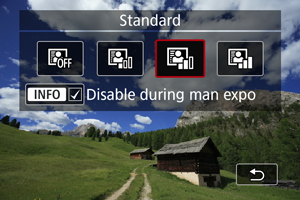
- للضبط على [
 : Auto Lighting Optimizer/مُحسن الإضاءة التلقائي]، حتى مع وضع M اضغط على زر
  في الخطوة ٢ لمسح علامة الاختيار [
 ] من [تعطيل أثناء تعريض يدوي].